Scripted Control Tutorial
Introduction
The Live View on the web UI is handy for visualizing and quickly trying things out, but for most experiments more automated control is needed. That can be achieved via the HTTP API provided by pd-server, and this tutorial will walk through an example of using python to drive a simple demonstration dispensing drops from a reservoir, mixing them, splitting them, and finally putting them out to a waste reservoir.
Here’s a video of the demo script in action:
The JSON-RPC API
The control API is provided on port 7000, at the /rpc route. All control is
done via remote procedural calls (RPC) conforming to the JSON-RPC
specification. In this tutorial we will be using the Python programming language
and the pdclient library for interacting
with the PurpleDrop, but it’s possible to control it using any programming
language you prefer.
The API offers a number of functions. For the most up-to-date list of available RPC functions, you can open the /rp/map route in your browser.
Installing pdclient
Install the pdclient package from the git repository:
git clone https://github.com/uwmisl/pdclient
cd pdclient
pip3 install .
Writing the control script
Create a python file, e.g. run_demo.py or whatever you like. For this tutorial, we’ll go through the code below which dispenses two drops from one of the reservoirs, merges them, moves them around in a circle to mix, and then splits them apart and moves them out to different reservoir. This is designed specifically to run on the MISL v4.1 electrode board, but it can be adapted to run on other electrode boards.
Here’s the full code:
import time

import pdclient
from pdclient.drop import Drop, Dir

class DropError(Exception):
    pass

# Specifies the URI to connect to the pd-server RPC endpoint
PDHOST = "http://purpledrop:7000/rpc"
# Capacitance threshold for assuming drop is present on a grid (extend) electrode
DROP_PRESENT_THRESHOLD = 3.0
# Capacitance threshold for assuming drop is not present on bridge electrode
DROP_NOT_PRESENT_THRESHOLD = 4.0

TIMEOUT = 6

def try_for(func, timeout):
    """Utility to poll a condition function with a timeout

    Returns True if func() returned True prior to timeout, or False on timeout
    """
    start = time.time()
    while True:
        if func():
            return True
        elif time.time() - start > timeout:
            return False
        time.sleep(0.5)

class Reservoir(object):
    """A class for controlling a reservoir
    """
    def __init__(self, A_pin, B_pin, extend_pins, drop_start, client):
        self.A_pin = A_pin
        self.B_pin = B_pin
        self.extend_pins = extend_pins
        self.drop_start = drop_start
        self.client = client

    def extend(self):
        """Extend the drop out of the reservoir
        """
        extend_electrodes = self.extend_pins + [self.B_pin]
        self.client.enable_pins(extend_electrodes)

        def extend_is_complete():
            cap = self.client.bulk_capacitance()
            extend_caps = [cap[e] for e in extend_electrodes]
            print(f"Extend cap: {extend_caps}")
            if all([c > DROP_PRESENT_THRESHOLD for c in extend_caps]):
                return True

        success = try_for(extend_is_complete, TIMEOUT)
        if not success:
            raise DropError("Failed to extend")

    def separate(self):
        """Split an already extended drop off from the main reservoir volume
        """
        output_electrodes = self.extend_pins
        bridge_electrodes = [self.B_pin]
        reservoir_electrodes = [self.A_pin]

        def separate_is_complete():
            cap = self.client.bulk_capacitance()
            output_caps = [cap[e] for e in output_electrodes]
            bridge_caps = [cap[e] for e in bridge_electrodes]
            print(f"Separate caps: output {output_caps}, bridge {bridge_caps}")
            return all([c > DROP_PRESENT_THRESHOLD for c in output_caps]) and \
                   all([c < DROP_NOT_PRESENT_THRESHOLD for c in bridge_caps])

        self.client.enable_pins(output_electrodes + bridge_electrodes)
        time.sleep(0.3)
        self.client.enable_pins(output_electrodes)
        time.sleep(0.3)
        self.client.enable_pins(output_electrodes + reservoir_electrodes)
        success = try_for(separate_is_complete, TIMEOUT)
        self.client.enable_pins([])
        if not success:
            raise DropError("Failed to separate")

    def ingest(self):
        """Pull a drop into the reservoir
        """
        electrodes = [self.A_pin, self.B_pin] + self.extend_pins[0:2]

        n = len(electrodes)
        for i in range(n):
            self.client.enable_pins(electrodes[0:n-i])
            time.sleep(0.5)

        time.sleep(0.5)

    def dispense(self):
        """Dispense a new drop from the reservoir

        Raises a DropError exception on failure.
        """
        self.extend()
        self.separate()
        drop = Drop(self.drop_start, (2, 2), self.client)
        return drop

client = pdclient.PdClient(PDHOST)

# Define the four reservoirs for the v4.1 electrode board
RES1 = Reservoir(
    A_pin=12,
    B_pin=13,
    extend_pins=[14,15,11],
    drop_start=[1, 0],
    client=client)

RES2 = Reservoir(
    A_pin=116,
    B_pin=114,
    extend_pins=[113,112,96],
    drop_start=[7, 0],
    client=client)

RES3 = Reservoir(
    A_pin=56,
    B_pin=57,
    extend_pins=[55,58,39],
    drop_start=[1, 7],
    client=client)

RES4 = Reservoir(
    A_pin=75,
    B_pin=73,
    extend_pins=[71, 72, 82],
    drop_start=[7, 7],
    client=client)

def move(drop, sequence, c, delay=0.25):
    """ Move a drop through a sequence of directions

    This uses the `move_drop` RPC call, which uses capacitance feedback to
    determine when a move is complete, and may fail if drop movement is not
    detected

    Arguments:
      - drop: A pdclient.drop.Drop object to be moved; this specifies the
        starting location of the drop
      - sequence: A list of pdclient.drop.Dir values (UP, DOWN, LEFT, RIGHT)
        to be executed
      - delay: The amount of delay to insert between each move operation
    """
    for step in sequence:
        result = drop.move(step)
        if not result['success']:
            raise DropError("Failed to move drop")
        time.sleep(delay)

def split_generator(center):
    """Generate a sequence of electrode locations to enable
    to spread a drop to both sides about the `center` position given, and then
    split it.

    Arguments:
      center: A tuple containing (x, y) location of the center point.
    """
    x = center[0]
    y = center[1]
    points = set()
    # Create initial 1x5 row of electrodes
    for i in range(-2, 3):
        points.add((x + i, y))
    yield points
    # Grow by 1 on each end
    points.add((x - 3, y))
    points.add((x + 3, y))
    yield points
    # Turn off the center; this is the split point
    points.remove((x, y))
    # Turn on electrodes above to increase "pull" area and ensure split
    points.add((x + 3, y - 1))
    points.add((x - 3, y - 1))
    points.add((x + 2, y - 1))
    points.add((x - 2, y - 1))
    yield points

def open_loop_sequence(sequence, c, delay=1.0):
    """Apply a sequence of pins with fixed delay between each
    """
    for step in sequence:
        electrodes = [c.get_pin(loc) for loc in step]
        c.enable_pins(electrodes)
        time.sleep(delay)

def main():
    # Make sure all electrodes are off, and delay start up a few seconds
    client.enable_pins([])
    time.sleep(3.0)

    # Dispense two drops and move them to a desired location
    drop1 = RES3.dispense()
    move(drop1, [Dir.RIGHT] * 6 + [Dir.UP] * 4, client)

    drop2 = RES3.dispense()
    move(drop2, [Dir.RIGHT] * 1 + [Dir.UP] * 4, client)

    time.sleep(2.0)

    # Move the two drops together
    move(drop1, [Dir.LEFT] * 2, client)
    move(drop2, [Dir.RIGHT] * 2, client)

    # Create a new, larger drop and move it around to mix
    merged_drop = Drop(drop1.pos, (3, 2), client)
    client.enable_pins(merged_drop.pins())
    time.sleep(0.5)
    move(merged_drop,
        [Dir.UP] * 2 + \
        [Dir.RIGHT] * 2 + \
        [Dir.DOWN] * 4 + \
        [Dir.LEFT] * 6 + \
        [Dir.UP] * 4 + \
        [Dir.RIGHT] * 2 + \
        [Dir.DOWN] * 2,
        client)

    client.enable_pins([])
    time.sleep(3.0)

    # Split the drop into two
    open_loop_sequence(split_generator((4, 4)), client)

    # Move both resulting drops to waste reservoir
    drop1 = Drop((2, 3), (2, 2), client)
    drop2 = Drop((6, 3), (2, 2), client)
    move(drop1, [Dir.UP]*3 + [Dir.RIGHT]*6, client)
    RES2.ingest()
    move(drop2, [Dir.UP]*3 + [Dir.RIGHT]*2, client)
    RES2.ingest()

    client.enable_pins([])

if __name__ == '__main__':
    main()
Now, we’ll look more closely at some of the sections of that code to explain.
Reservoir control
Alot of the code is dedicated to the Reservoir class. This encapsulates the dispense and ingest operations that can be done on any of the four reservoirs.
def __init__(self, A_pin, B_pin, extend_pins, drop_start, client):
    self.A_pin = A_pin
    self.B_pin = B_pin
    self.extend_pins = extend_pins
    self.drop_start = drop_start
    self.client = client
When a Reservoir is created, it is given all of the pin numbers used for dispensing on this reservoir.
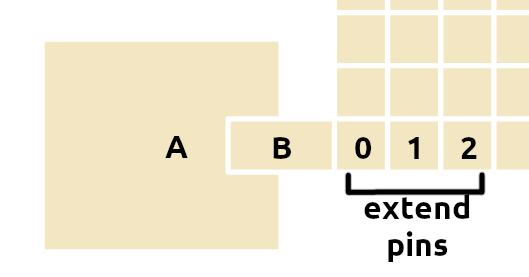
Location of the pin names on an example reservoir
These pins can be determined by consulting the board definition file, or by
mousing over the electrodes displayed on the Capacitance panel of the dashboard
app to find the pin for each electrode of interest. The drop_start option is
a tuple containing the x,y location of the top-left corner where a new 2x2 drop
should be created after dispense.
def extend(self):
    """Extend the drop out of the reservoir
    """
    extend_electrodes = self.extend_pins + [self.B_pin]
    self.client.enable_pins(extend_electrodes)

    def extend_is_complete():
        cap = self.client.bulk_capacitance()
        extend_caps = [cap[e] for e in extend_electrodes]
        print(f"Extend cap: {extend_caps}")
        if all([c > DROP_PRESENT_THRESHOLD for c in extend_caps]):
            return True

    success = try_for(extend_is_complete, TIMEOUT)
    if not success:
        raise DropError("Failed to extend")
The reservoir performs two high level actions: dispense and ingest. The dispense action is broken up into two steps: extend and separate. All of the reservoir actions are performed by turning on different subsets of electrodes, and then polling the capacitance readings to detect a desired condition. When extending, the desired condition is that all three of the extend electrodes should read a minimum capacitance; i.e. they should all have water over them.
Here, two RPC calls are used:
The
enable_pinsfunction takes a list of pin numbers, and enables these electrodes (any not in the list are disabled)The
bulk_capacitancefunction returns the most recent capacitance scan measurement. Twice a second, the purpledrop performs a capacitance scan during which it measures the capacitance of every electrode individually. The return value ofbulk_capacitanceis a list of 128 floats giving the capacitance for each electrode in pF (picofarads).
The try_for function helps to implement this pattern of polling a function and waiting for it to return true, and it adds a timeout so that if the function does not return true after a period of time has elapsed, it will return false. If after the timeout (in this case, 6 seconds) period elapses, the extend function does not detect water over all of the extend electrodes, then it will fail by raising a DropError exception.
The separate function works similarly, but drives different series of
electrode activations to split the drop by leaving the extend electrode on,
turning off the ‘B’ electrode, and turning on ‘A’ to pull some back pressure on
the extended drop, hopefully splitting it over the inactive bridge. For success
criteria, it looks for little capacitance on the bridge, but for drops still to
be present on the extended electrodes.
# Define the four reservoirs for the v4.1 electrode board
RES1 = Reservoir(
    A_pin=12,
    B_pin=13,
    extend_pins=[14,15,11],
    drop_start=[1, 0],
    client=client)
For each of the four reservoirs on the board, an instance of the Reservoir class is created with different pin settings. This way, the details are pushed away into the class, and any can be used the same way as another.
The move function
def move(drop, sequence, c, delay=0.25):
    """ Move a drop through a sequence of directions

    This uses the `move_drop` RPC call, which uses capacitance feedback to
    determine when a move is complete, and may fail if drop movement is not
    detected

    Arguments:
      - drop: A pdclient.drop.Drop object to be moved; this specifies the
        starting location of the drop
      - sequence: A list of pdclient.drop.Dir values (UP, DOWN, LEFT, RIGHT)
        to be executed
      - delay: The amount of delay to insert between each move operation
    """
    for step in sequence:
        result = drop.move(step)
        if not result['success']:
            raise DropError("Failed to move drop")
        time.sleep(delay)
The move function is actually quite simple, but it introduces the
Drop object
from the pdclient library. A Drop is a python class designed to track the state
of a drop on the board. It knows the positon, and the size of the drop, and it
has a reference to a client that it can use to control the drop to create a
simpler API. This means that you can call drop.move(Dir.RIGHT) to physically
move the drop and to update the position stored in that drop object to the new
position.
Under the hood, the drop move method is using the move_drop RPC call to
execute the move. This function provides “closed-loop” drop movement by using
the capacitance measurements to determine when the drop has been moved, or to
detect failure if it does not move. It’s possible to move a drop
by simply turning on the neighboring electrodes (the ones you want it to move
to) and waiting a fixed period of time, but this will in general be slower and
if the drop does not move you won’t know!
Note
The move_drop RPC call returns more information, including the initial capacitance on the starting electrodes, the final capacitance on the destingation electrodes, and a high-frequency (500Hz) time series of the destination capacitance during the move. This can be useful for getting a higher precision measurement of drop velocity, when that is of interest.
Here’s a example of the data returned by move_drop:
    {
        "success": true,
        "closed_loop": true,
        "closed_loop_result": {
            "pre_capacitance": 1001,
            "post_capacitance": 990,
            "time_series": [0.0, 0.002, 0.004, <snip>, 0.60],
            "capacitance_series": [600, 610, 624, <snip>, 990]
        }
    }
Defining the drop split procedure
For splitting in this demo, we just do a simple open-loop sequene of activations. The basic procedure is to spread the drop out in a long line, then turn off an electrode in the middle, and turn on more electrodes at each end to create pressure to pull the drop on both sides, causing them to be split off in the middle.
This split_generator function is a python generator
which yields a sequence of electrode lists to turn on.
It’s a little bit flexible, in that it can be
performed at different locations on the board via the center argument, but
it’s still fairly specific to the size of drop used in this demo, and may
have to be adjusted for different situations.
def split_generator(center):
    """Generate a sequence of electrode locations to enable
    to spread a drop to both sides about the `center` position given, and then
    split it.

    Arguments:
      center: A tuple containing (x, y) location of the center point.
    """
    x = center[0]
    y = center[1]
    points = set()
    # Create initial 1x5 row of electrodes
    for i in range(-2, 3):
        points.add((x + i, y))
    yield points
    # Grow by 1 on each end
    points.add((x - 3, y))
    points.add((x + 3, y))
    yield points
    # Turn off the center; this is the split point
    points.remove((x, y))
    # Turn on electrodes above to increase "pull" area and ensure split
    points.add((x + 3, y - 1))
    points.add((x - 3, y - 1))
    points.add((x + 2, y - 1))
    points.add((x - 2, y - 1))
    yield points
To execute the split sequence, another utility function is defined:
open_loop_sequence.
def open_loop_sequence(sequence, c, delay=1.0):
    """Apply a sequence of pins with fixed delay between each
    """
    for step in sequence:
        electrodes = [c.get_pin(loc) for loc in step]
        c.enable_pins(electrodes)
        time.sleep(delay)
This function just takes a list of lists of enabled pins
and turns each on in succession with a fixed delay in between. Note the
PdClient.get_pin
function, which converts an (x, y) location into a pin number, using the data
provided in the board definition.
The main sequence
That covers all of the setup/utility functions. Now in the main function,
we essentially just define a sequence of actions using the utilities we’ve
already created. This process is fairly simple, using
pre-programmed paths to move the drops where we want them to go.
def main():
    # Make sure all electrodes are off, and delay start up a few seconds
    client.enable_pins([])
    time.sleep(3.0)

    # Dispense two drops and move them to a desired location
    drop1 = RES3.dispense()
    move(drop1, [Dir.RIGHT] * 6 + [Dir.UP] * 4, client)

    drop2 = RES3.dispense()
    move(drop2, [Dir.RIGHT] * 1 + [Dir.UP] * 4, client)

    time.sleep(2.0)

    # Move the two drops together
    move(drop1, [Dir.LEFT] * 2, client)
    move(drop2, [Dir.RIGHT] * 2, client)

    # Create a new, larger drop and move it around to mix
    merged_drop = Drop(drop1.pos, (3, 2), client)
    client.enable_pins(merged_drop.pins())
    time.sleep(0.5)
    move(merged_drop,
        [Dir.UP] * 2 + \
        [Dir.RIGHT] * 2 + \
        [Dir.DOWN] * 4 + \
        [Dir.LEFT] * 6 + \
        [Dir.UP] * 4 + \
        [Dir.RIGHT] * 2 + \
        [Dir.DOWN] * 2,
        client)

    client.enable_pins([])
    time.sleep(3.0)

    # Split the drop into two
    open_loop_sequence(split_generator((4, 4)), client)

    # Move both resulting drops to waste reservoir
    drop1 = Drop((2, 3), (2, 2), client)
    drop2 = Drop((6, 3), (2, 2), client)
    move(drop1, [Dir.UP]*3 + [Dir.RIGHT]*6, client)
    RES2.ingest()
    move(drop2, [Dir.UP]*3 + [Dir.RIGHT]*2, client)
    RES2.ingest()

    client.enable_pins([])
Executing the script
You can run the script on a command line, e.g. python run_demo.py, or you
can put the code into a jupyter notebook and run it there. Really any python
environment you prefer should work.
While running the script, you can keep the dashboard open in a browser window
to watch it in action. It will highlight which electrodes are activated, and
if you have pdcam running, it can overlay the active electrodes on the video.