Feedback Controlled Droplet Splitting
Introduction
As of embedded software version 0.4.1, the PurpleDrop supports pulse-width modulation of the voltage on active electrodes, and using the capacitance measurement as feedback for controlling the duty cycle. Control is done on the microcontroller at a rate of 500Hz, allowing rapid adjustment of pressure on both sides of the drop as it splits to help ensure that the final volume after split is closer to a desired value. This tutorial walks through the new features, and includes software examples of how to configure the purpledrop for splitting.
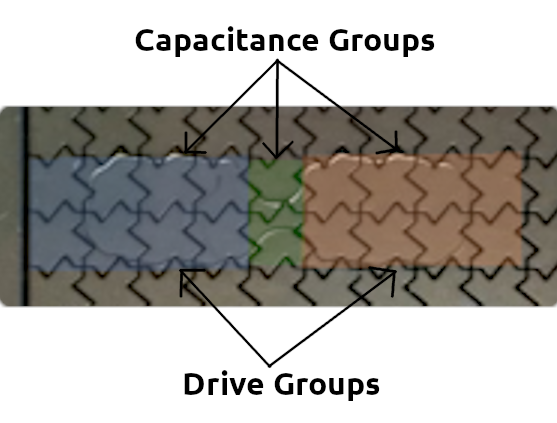
Example of a split in progress, with electrodes highlighted. Three capacitance sensing groups are defined, one for the left side, one for the right, and one for the “bridge” which can be used to detect when drop split has been achieved. Two drive groups are defined, one for each side of the bridge where the drop is to be split. Pulse width modulation is applied to the two drive groups to adjust the pressure on each side, keeping the volumes balanced as the drop splits.
Drive Groups and PWM Modulation
The set_electrode_pins function now supports two separate drive groups. Each
drive group has an independent set of pins, and a duty cycle setting.
Normally, when an electrode is activated, the voltage V_HV is applied between the electrode and the top plate all the time. When the duty cycle setting is less than 255 (100%) the electrode will be turned on at the top of each 1kHz cycle, and it will be turned off part-way through the cycle. If the duty cycle is set to 128, it will be turned off half-way through the cycle, after 0.5ms.
Since this modulation is done at 1kHz, and the inertia of the drop prevents it from responding to changes at that time scale, the practical effect of this is akin to reducing the voltage on the electrode.
Note
There are some practical limitations to what duty cycle can be applied. Even at 100% duty cycle, the voltage is not truly all of the time. It is off briefly during each AC cycle in order to perform active and group capacitance measurement, and it is interrupted further every half second in order to perform a capacitance scan of all electrodes. Note that the minimum amount of off time each cycle is increased when more capacitance groups are enabled.
Capacitance Sensing Groups
A new mode of capacitance measurement has been added, dubbed the “group” capacitance. Up to five sets of electrodes can be defined, and each will have their capacitance measured together at 500Hz.
The set_capacitance_group RPC function supports configuring a group. It’s
signature is:
set_capacitance_group(pins: Sequence[int], group_id: int, setting: int)
For example, set_capacitance_group([12, 13, 14], 0, 0) will configure group 0
to measure the combined capacitance of pins 12, 13, and 14, at high gain.
Capacitance groups can be used as input for the feedback controller, and they
can also be read via pdclient using the group_capacitance
method.
Each group can be setup to measure at high or low gain, by adjusting the setting parameter. See pdclient documentation for details.
Feedback Control
So now we’ve got a measurement (capacitance groups), and actuators (two drive groups with adjustable duty cycle), so we can wire them up!
The feedback control needs to happen on the microcontroller so that it can happen fast with low latency. The feedback control module operates in two different modes:
NORMAL: Make the measurement match a constant target value
DIFFERENTIAL: Make the difference between two measurements match a constant target value.
Feedback control is enabled by the set_feedback_command RPC function:
set_feedback_command(self, target, mode, input_groups_p_mask, input_groups_n_mask, baseline)
Multiple input groups may be added to form the controller inputs, e.g. setting
input_groups_p_mask to 3 ((1<<0) | (1<<1)) would sum group 0 and group 1.
The negative input groups, defined by input_groups_n_mask are used only in
differential mode, where the input measurement is defined as (sum(groups_p) - sum(groups_n)).
The positive output of the controller is always applied to drive group 0, while the negative is applied to drive group 1; this means that when the input is less than the target, the group0 duty cycle will be higher than group 1.
The baseline value defines the output for both groups when the error is 0 (i.e. when the input is equal to target). The output of the controller creates a difference between the drive groups. In order to create the difference, first the output with the higher voltage is increased, up to the maximum of 255. Once this output is saturated, the remaining difference is achieved by lowering the duty cycle of the decreased output group. For the details of controller implementation, you can have a look at the source on github.
Feedback Gains
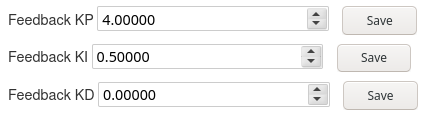
The P, I, and D gains of the controller can be adjusted as configuration
parameters using the Dashboard UI, or programmatically via the set_parameter
RPC call. A reasonable starting value for these gains is P=4.0, I=0.5, D=0.0,
but these are not carefully tuned and may depend on setup details, like top
plate height, voltage setting, electrode size, fluid viscosity, etc.
Software Examples
Here are two quick examples of python code to perform two different splitting operations. The first dispenses a drop from a reservoir, the second performs a series of half and half splits, starting with a large drop, using the differential mode.
Dispense Example
import pdclient
import time

OUT_PINS = [71, 72, 82]
BRIDGE_PINS = [73]
PULL_PINS = [75]

# First stage gain
GAIN1 = 2.0
# Integrator gain (Vout per integrated input V*s)
GAIN2 = 25000.0
# Output stage gain
GAIN3 = 22.36
# Sense resistances for high/low gain
RLOW = 33.0
RHIGH = 220.0
VOLTAGE = 180.
CAPGAIN_HIGH = RHIGH * GAIN1 * GAIN2 * GAIN3 * 4096. / 3.3
CAPGAIN_LOW = RLOW * GAIN1 * GAIN2 * GAIN3 * 4096. / 3.3

HOST = "http://purpledrop:7000/rpc"

client = pdclient.PdClient(HOST)

stopping = False

try:
    client.set_capacitance_group(OUT_PINS, 0, 0)
    client.set_capacitance_group(BRIDGE_PINS, 1, 0)
    client.set_capacitance_group(PULL_PINS, 2, 1)
    client.set_capacitance_group([OUT_PINS[0]], 3, 0)
    client.set_capacitance_group([OUT_PINS[1]], 4, 0)

    for _ in range(5):
        print("Extending...")
        client.enable_pins(OUT_PINS+BRIDGE_PINS, 0, 255)
        client.enable_pins([], 1, 255)
        time.sleep(2.0)

        # Setup groups
        client.enable_pins(OUT_PINS)
        time.sleep(0.2)
        client.enable_pins(OUT_PINS, 0, 20)
        client.enable_pins(PULL_PINS, 1, 20)

        # Turn on feedback
        print("Feedback on")
        # Convert 20 pF to counts
        TARGET_CAPACITANCE = 20 * CAPGAIN_HIGH * VOLTAGE / 1e12
        print(f"Target capacitance: {TARGET_CAPACITANCE}")
        client.set_feedback_command(TARGET_CAPACITANCE, pdclient.FB_NORMAL, (1<<0), (1<<1), 240)

        # Wait a while and quit
        time.sleep(2.0)
        print(f"Final capacitance: {client.group_capacitance()['raw'][0]}")
        # Turn off feedback control
        client.set_feedback_command(0, pdclient.FB_DISABLED, 0, 0, 0)
        # Turn off all electrodes
        client.enable_pins([], 0, 255)
        client.enable_pins([], 1, 255)

        # Pull drop back into reservoir
        client.enable_pins(BRIDGE_PINS + PULL_PINS)
        time.sleep(0.5)
        client.enable_pins(PULL_PINS)
        time.sleep(0.5)
        client.enable_pins([])
        time.sleep(2.0)

finally:
    # Make sure all electrodes are off after exception or finish
    client.set_feedback_command(0, pdclient.FB_DISABLED, 0, 0, 0)
    client.enable_pins([], 0, 255)
    client.enable_pins([], 1, 255)
Here, we extend the drop from the reservoir to cover 3 electrodes, and we can then split it off using the feedback controller at any volume less than the 3 electrodes worth it started with. Note that capacitance is set in counts. As of this writing, the purpledrop software doesn’t handle normalizing units to pF, although it miy in future releases. The capacitance-to-volume ratio can vary depending on the dielectric, and the capacitance-to-counts ratio depends on the voltage setting as well. This relationship can be calibrated if you know the gap size between the electrodes and top plate – and therefore the volume of fluid which covers one electrode – by moving a drop large enough to completely cover an electrode and measuring the capacitance while fully covered.
Dispense Example Video
Divide-by-2 Example
import pdclient
from pdclient.client import CapacitanceGroupSetting, FeedbackMode
from pdclient.drop import Drop

import time

HOST = "http://purpledrop:7000/rpc"

# Gain settings
LOWGAIN = 1
HIGHGAIN = 0

# Feedback mode settings
DISABLED = 0
NORMAL = 1
DIFFERENTIAL = 2

client = pdclient.PdClient(HOST)

def gather():
    """Activate a large square, and shrink it progressively to recollect
    split drops into one
    """
    # Turn off group 1
    client.enable_pins([], 1, 255)
    sequence = [
        ((1,1), (8, 7)),
        ((2,2), (6, 5)),
        ((3,2), (4, 4))
    ]
    for pos, size in sequence:
        drop = Drop(pos, size, client)
        client.enable_pins(drop.pins(), 0, 255)
        time.sleep(1.0)

def split(a_pins, b_pins, bridge_pins):
    """Perform an 50-50 split
    """
    # Set up three capacitance groups to measure the capacitance of the
    # two output regions, and the "bridge" region in between
    client.set_capacitance_group(a_pins, 0, LOWGAIN)
    client.set_capacitance_group(bridge_pins, 1, LOWGAIN)
    client.set_capacitance_group(b_pins, 2, LOWGAIN)

    # Disable group 1, and enable all electrodes on group 0 to collect
    client.enable_pins([], 1, 255)
    client.enable_pins(a_pins+b_pins+bridge_pins, 0, 255)
    time.sleep(1.0)

    # Measure and pring starting capacitance
    raw = client.group_capacitance()['raw']
    print(f"pre-split: {raw[0] + raw[1] + raw[2]} ({raw[0:3]})")

    # Set up the two drive groups with pins from group a and b respectively
    client.enable_pins(a_pins, 0, 0)
    client.enable_pins(b_pins, 1, 0)
    # Enable feedback control in differential mode, with a target of 0,
    # using groups 0 and 2 (a_pins and b_pins)
    # This is attempting to set (C_group0 - C_group2) = 0, i.e. both groups
    # should have equal capacitance.
    client.set_feedback_command(0, DIFFERENTIAL, (1<<0), (1<<2), 255)

    # Wait 3 seconds for split to complete
    # This could be sped up by monitoring capacitance and quitting when the
    # bridge capacitance gets low enough
    time.sleep(3.0)

    # Take measurement
    raw = client.group_capacitance()['raw']
    print(f"post-split: {raw[0] + raw[2]} ({raw[0:3]})")

    # Disable feedback control and turn off drive electrodes
    client.set_feedback_command(0, DISABLED, 0, 0, 0)
    client.enable_pins([], 0, 255)
    client.enable_pins([], 1, 255)

time.sleep(1.0)

# Define the locations where splits will be performed
dropA1 = Drop((0, 3), (4, 2), client)
dropB1 = Drop((5, 3), (4, 2), client)
bridge1 = Drop((4, 3), (1, 2), client)

dropA2 = Drop((6, 0), (1, 4), client)
dropB2 = Drop((6, 5), (1, 4), client)
bridge2 = Drop((6, 4), (1, 1), client)

dropA3 = Drop((3, 7), (3, 1), client)
dropB3 = Drop((7, 7), (3, 1), client)
bridge3 = Drop((6, 7), (1, 1), client)

try:
    # repeat procedure 5 times
    for _ in range(5):
        # First gather drops into known location
        gather()
        # Perform sequence of 3 splits
        split(dropA1.pins(), dropB1.pins(), bridge1.pins())
        time.sleep(1.0)
        split(dropA2.pins(), dropB2.pins(), bridge2.pins())
        time.sleep(1.0)
        split(dropA3.pins(), dropB3.pins(), bridge3.pins())
finally:
    # Turn things off, when we fail or complete
    client.set_feedback_command(0, DISABLED, 0, 0, 0)
    client.enable_pins([], 0, 255)
    client.enable_pins([], 1, 255)
In this example, a large drop – about large enough to cover 12 electrodes – is placed on the PurpleDrop. The script first collects the drop into a known location, and then splits it in half. The differential mode of the feedback controller is used to drive the drops to split so that each side of the split has an equal capacitance. After this, one of the split off drops is divided in half again, and one of these once again further. The script then re-collects the split drops and repeats for a total of 5 times.